A simple business website in India costs about ₹15,000. An Android app with a website usually starts around ₹60,000, and software with logins, payments and a live database starts around ₹90,000. Bigger platforms run into lakhs. The real number depends on what your app has to do, not on how many screens it has.
This guide uses our own price list at LINA Apps, so the numbers are real, not guesses. Other studios will charge differently, but the reasons prices go up or down are the same everywhere.
Prices at a glance
| What you get | Starting price | Typical time |
|---|---|---|
| Business website, up to 5 pages | ₹14,999 | 7–10 days |
| Website + Android app on Google Play | ₹59,999 | 2–6 weeks |
| Web app or CRM with logins and a live database | ₹89,000 | 5–7 weeks |
| Android app + web dashboard, one shared database | ₹1,79,000 | 8–12 weeks |
| Multi-branch platform with salesman and delivery apps | ₹3,50,000+ | 12+ weeks |
These are starting prices. The exact price comes after a short call where we understand what your business needs.
What actually changes the price
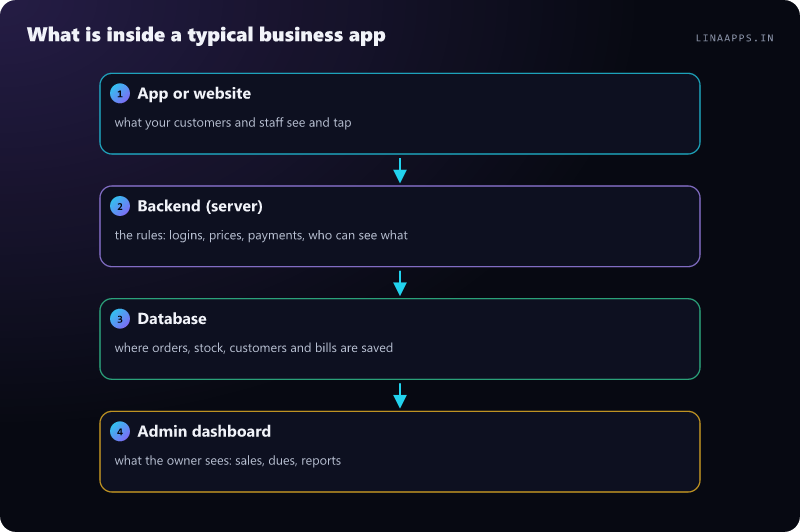
Screens are cheap. What the app has to remember and who can see what is where the cost lives. Here is what moves the number most:
- Logins. An app anyone can open is simple. An app where customers log in with an OTP, and staff see different things from the owner, needs a secure server and permission rules.
- Online payments. Taking UPI or card payments means connecting a payment gateway, confirming every payment safely, and handling refunds.
- Live data shared by many people. If the shop counter, the godown and the owner's phone must all see the same stock in real time, you need a proper database and sync.
- Working offline. Apps for shops and field staff should keep working when the internet drops and sync later. This takes extra care to build, but it saves a lot of trouble later.
- Integrations (APIs). WhatsApp alerts, SMS, email, Tally exports or an existing system all add work.
- iPhone too. A separate iPhone app adds cost. Many Indian businesses start with Android and a website, because most of their customers use Android.
The costs after launch (people forget these)
The build is a one-time cost. These come every year or every month:
| Cost | Typical amount | Notes |
|---|---|---|
| Google Play developer account | US$25, one time | Paid once to Google, in your own name |
| Apple Developer Program (only for iPhone apps) | US$99 per year | Only if you publish on the App Store |
| Domain name | about ₹800–1,500 a year | Your website address, in your name |
| Hosting and database | about ₹500–5,000 a month | Grows with users and data |
| Payment gateway fee | about 2% per payment + GST on the fee | Razorpay's standard rate, for example |
| Care plan (updates, backups, small changes) | ₹499–4,999 a month at LINA Apps | Optional, but Android changes every year |
Tip: always ask who owns the Google Play account, the domain and the database. They should be in your name. If a developer keeps them, moving away later becomes very hard.
How a project runs, week by week
- 1Discovery callWe understand how your business works today and what slows it downDay 1–2
- 2Scope, price and datesOne page: what we build, what we don't, the fixed price and the datesDay 2–3
- 3Screens before codeYou approve every screen first; changing a design is cheapWeek 1
- 4Build with a weekly demoA working build on your phone every weekWeeks 2–5
- 5Launch and trainingPublished, staff trained, then a 60-day bug-fix warrantyLaunch week
How to keep your app's cost down
- Start with the smallest version that earns money. Launch the one feature your customers need most, then add the rest based on what they actually ask for.
- Write down how you work today, for example who takes the order, who bills and who delivers. A clear process can save weeks of work.
- Choose Android + web first unless most of your customers use iPhones.
- Ask for a fixed price in writing, paid by milestones, not one big payment upfront.
- Don't pay for features "for later". Plan them, but build them when you need them.
Cheap freelancer, ready-made app or custom build?
| Option | Upfront cost | Good for | Watch out for |
|---|---|---|---|
| Ready-made app (monthly subscription) | Low | Standard billing or booking | Pay forever, can't change how it works |
| Very cheap freelancer or template | Low | A quick demo | Often no source code, no support, slow or insecure |
| Custom build by a studio | Higher | A process that is yours | Choose one that hands over the code and accounts |
If a ready-made app does exactly what you need, use it. Custom software makes sense when your process is your advantage, or when monthly per-user fees keep adding up.
Frequently asked questions
How much does a simple app cost in India?
A simple Android app with a basic website starts at about ₹60,000 with LINA Apps. Apps with logins, payments and a live database start at about ₹90,000.
How long does it take to build an app?
A website takes 7–10 days. Most apps take 2–6 weeks, and apps plus web dashboards take 8–12 weeks.
Is it cheaper to build only for Android?
Yes. Building one Android app plus a website is cheaper than separate Android and iPhone apps, and most Indian customers use Android.
Do I have to pay every month after the app is built?
You pay small running costs for hosting, the domain and payment fees. A care plan for updates is optional but recommended.
Who owns the app after it is built?
With LINA Apps, you do: the source code, Google Play account, domain and database are handed over in your name.